Hearing conservation program software that shows its work.
HCP Expert keeps the whole OSHA hearing conservation program in one record:
audiometric testing, baselines, standard threshold shift, employee notification and
the OSHA 300 decision. Every result sits next to the sentence of 29 CFR 1910.95 that
it answers.
Seven days, free, with a complete sample program. No card and no contract: the trial
runs on fictional data only. Built for the United States; the rules are read from the
official eCFR text of 29 CFR 1910.95 and 29 CFR 1904.10.
Screenshot of HCP Expert with fictitious data. 29 CFR 1910.95(g)(10).
What it does
The audiometric testing program from the test room to the OSHA 300 log, recorded once
and evaluated against the standard.
From the audiogram to the OSHA 300 decision
Each test is recorded with the audiometer, its calibration and the test room. The
result compares it with the baseline of each ear, and what the standard requires
next becomes an item with a date.
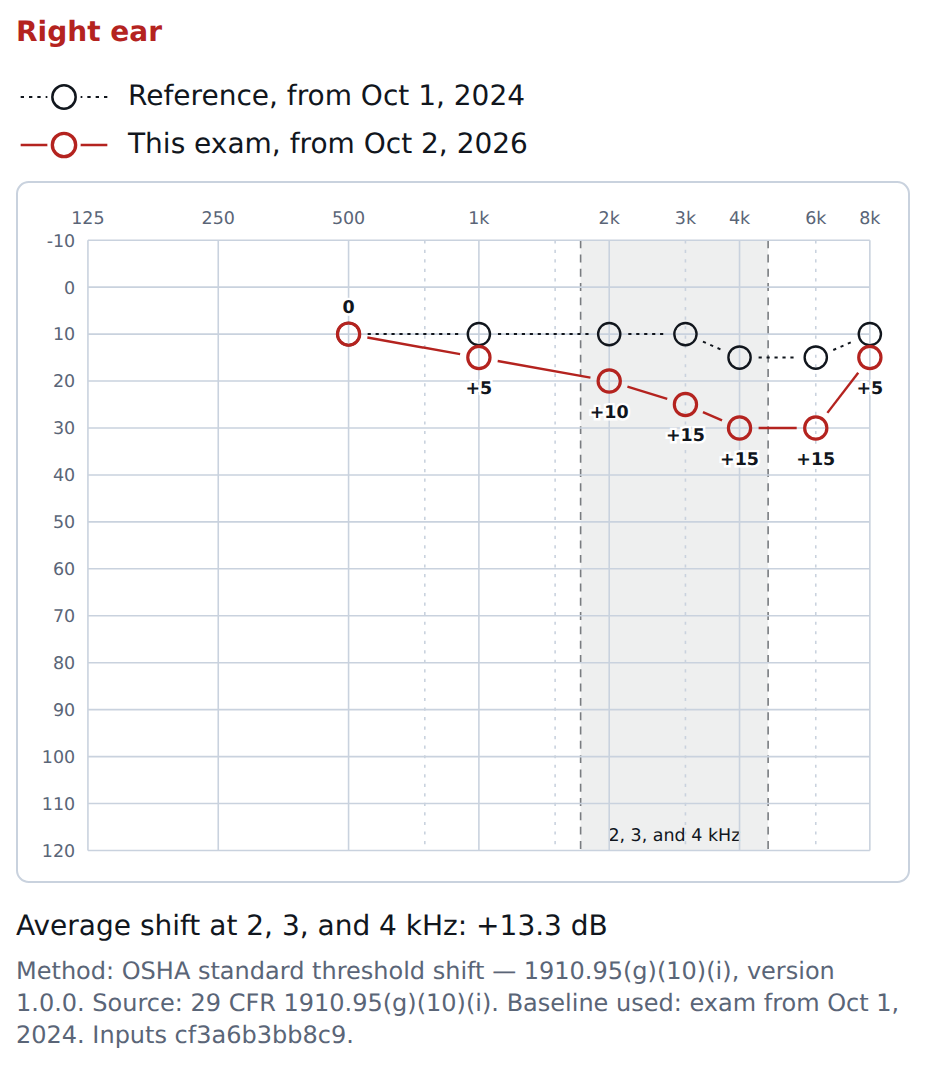
Standard threshold shift per ear, with the optional age correction generated from
the Appendix F tables. 1910.95(g)(10); Appendix F
Baseline and revised baseline kept per ear; the professional decides each
revision. 1910.95(g)(9)
Written notification to the employee and the recordability decision, each with
the rule quoted. 1910.95(g)(8); 1904.10
Illustration with fictitious data.
Who is due, and what is overdue
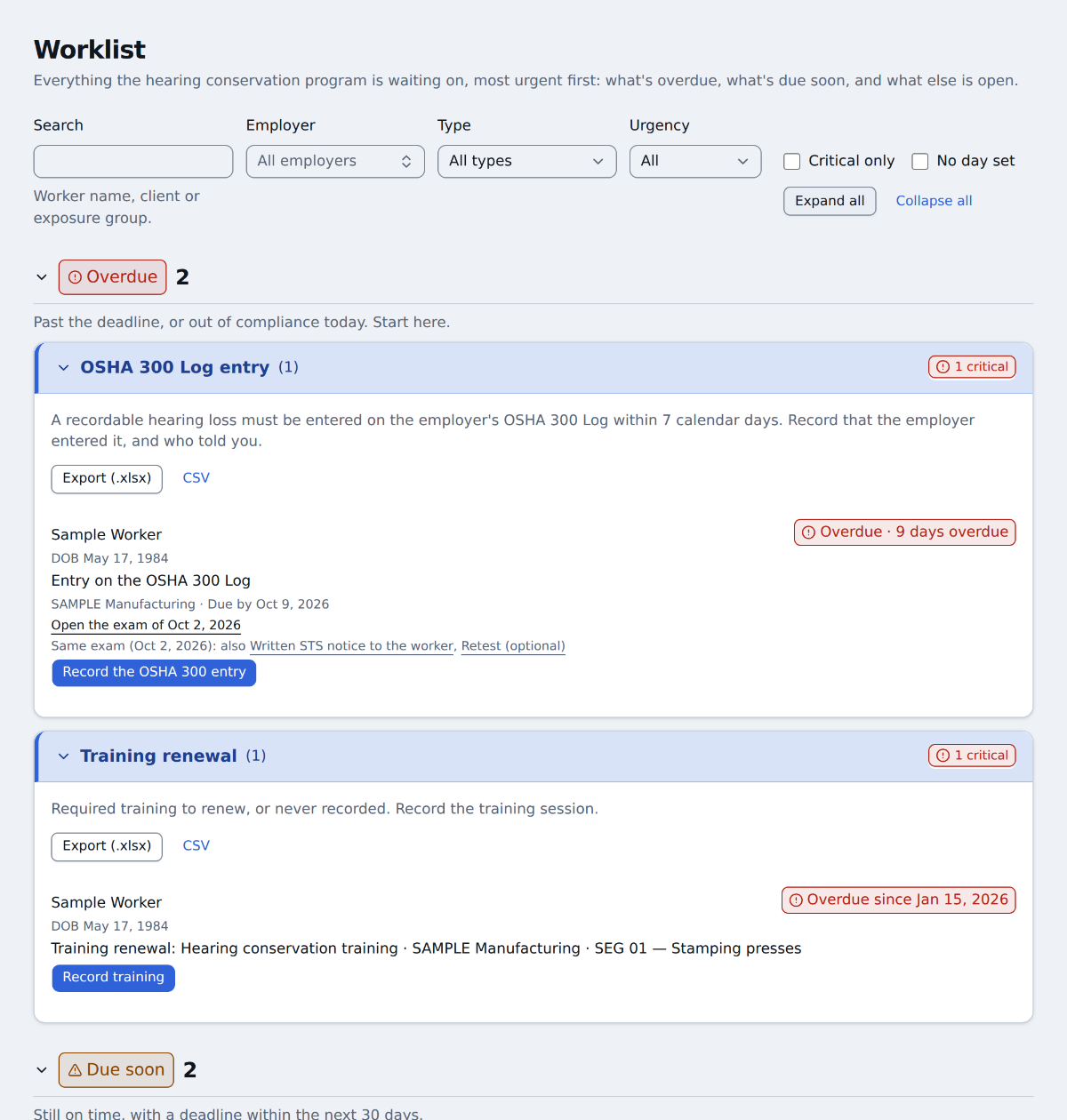
A due list for the program and a queue for the day. An overdue item raises an alert
that stays until someone resolves it, not until someone sees it.
Baseline, annual and retest audiograms, with the date each one is due.
1910.95(g)(5), (g)(6), (g)(7)
Hearing protector replacement, training and exams required by the exposure group,
with the due date derived from the interval your program declares.
Add workers to the queue of a day one by one or in a batch.
Screenshot of HCP Expert with fictitious data.
Exposure, from the group to the worker
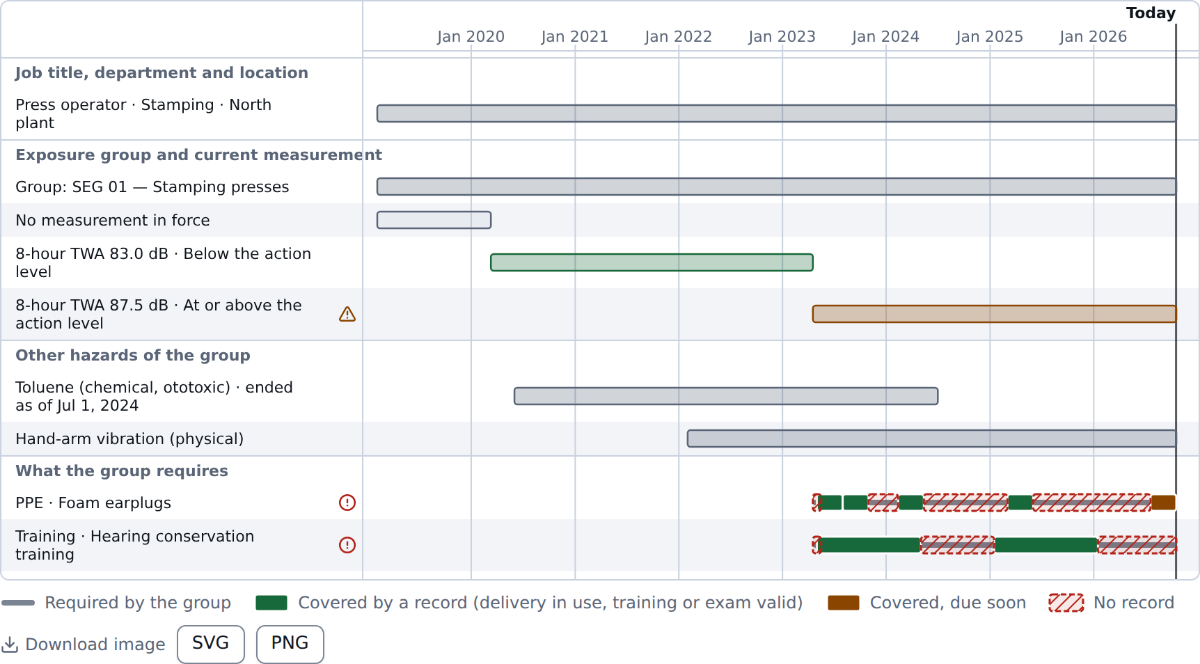
Similar exposure groups carry the representative noise measurement and the action
level as recorded data. Each worker's exposure timeline is read from the positions
held, so enrollment follows exposure.
The measurement in force for each group, with the source document attached.
1910.95(c)(1), (d)
What the group requires: hearing protectors from your own catalog, training and
exams.
One timeline per worker and employer: position, group, measurement and the
protectors issued.
Screenshot of HCP Expert with fictitious data.
A report anyone can verify
Each test report is stored as an immutable document with a SHA-256 hash. The QR
code on the page opens a public check that confirms the document without showing
the test or the name of the worker.
The check says whether a newer version exists, so an old paper is not mistaken for the current one.
Correcting a report creates a new version with the reason. The earlier one is kept.
The signature is applied to the hash of the document the professional opened.
Screenshot of HCP Expert with fictitious data. The QR code in the sample points to a test environment.
Also in the record
Audiometers, calibration and test rooms
The state of the calibration is evaluated on the date of the test, and the room
is checked against Table D-1.
1910.95(h); Appendices C, D and E
Employer structure
Units, departments and positions per employer. Renames are dated, so a report
shows the name in use on the day of the test.
Clinics with several units
Records are readable across the company, added from any unit, and changed only by
the unit that created them.
English, Spanish and Portuguese
Three languages in the interface, with the same record underneath.
Who it is for
Occupational health clinics
You test for many employer clients. Each client has its own program, structure and
exposure groups, kept apart from the others.
Mobile audiometric testing providers
You test on site. The audiometer, its calibration and the test room go with every
record, and the queue of the day tells you who is next.
Employers with an in-house program
You need the due list, the notification to the employee and the OSHA 300 decision
in one place, with the dates.
Industrial hygienists
You define the exposure groups and the representative measurements that decide
who is in the program.
Security and compliance, stated plainly
HCP Expert is designed to support the obligations of a covered entity or business
associate under HIPAA. We make no certification claim. What follows is what the
software does today.
Rules from the official text
Normative tables, Appendix F included, are generated from the official eCFR text,
and the source is kept with its hash. Nothing normative is typed in by hand.
Two-factor sign-in for everyone
Every account needs a second factor besides the password: a passkey, a security
key or an authenticator app. There is no way to opt out, and SMS or e-mail codes
are not offered.
Append-only audit trail
Audit events are never updated or deleted. Each one is chained by hash to the one
before it, so tampering can be detected.
Access to health information is logged
Each access to protected health information is written to the audit trail with
the user, the record and the time.
No PHI sent to third parties
Outbound connections pass through a single gate that allows only listed
destinations. No protected health information leaves for third-party services.
Roles per organization, data per customer
Permissions are granted by role in each organization and checked on every
request. Data is isolated per customer at the database level.
This website sets no cookies and loads no trackers, third-party scripts or external
fonts.
See it with your own program
Tell us how many employers, workers and testing sites you have. We will write back
to arrange a demonstration with sample data.